
Customizing your AI prompts for charting
An introduction to AI prompts
A Large Language Model (LLM) is used to generate chart content using AI. To provide accurate responses, the LLM needs clear instructions—this is called a prompt. Each chart question has its own prompt that tells the LLM how to respond.
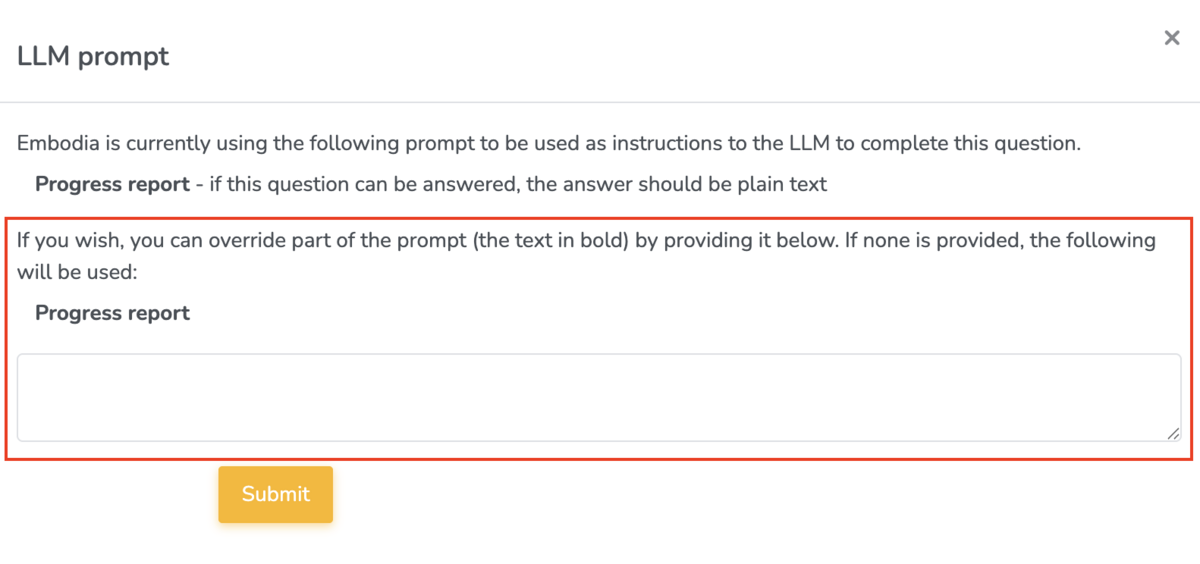
By default, Embodia uses the question itself as part of the prompt. If you’d like to customize it, click “Change LLM prompt” when creating or editing a chart item:

In the popup form, you can override part of the prompt (the text in bold):
Tips for Effective Prompts
When customizing AI prompts, following a few key guidelines will help improve accuracy and usefulness.
- Specificity - Provide clear and thorough instructions to the LLM—similar to how you would direct an assistant who is new to clinical documentation. The AI uses your instructions to extract and generate the correct information from the transcript. The more specific and precise the prompt, the better the AI can complete the task.
- Include Relevant Details - Specificity comes from detail. If the prompt doesn’t clearly describe the information you want for a chart item, the AI may miss or skip it. The more detailed you provide (e.g., examples, possible responses, or categories), the more accurately the AI can retrieve and populate that data.
- Review and Refine - AI charting is a tool that improves with use and refinement. Always review the AI’s output to identify any missing or incorrect information. If you notice recurring issues—such as an aggravating factor that’s frequently omitted—update the prompt to include it as an example or expected answer. Small adjustments make the prompt more effective over time.
Writing and refining prompts helps the AI generate more accurate, relevant, and consistent responses, which reduces the need for manual corrections and saves clinicians valuable time. Clear prompts ensure important clinical details aren’t missed and that documentation aligns with each clinician’s style and workflow. Over time, this refinement improves efficiency, supports better clinical decision-making, and makes charting a faster and more reliable process.
Example prompts
Now let's go through some examples of how to modify the LLM prompt for 4 of the 5 question types that Embodia's AI assistant can use, which are listed below:
- Free text - Multiline text
- Single Answer
- Multiple Answer
- Range
The 5th question type that can be used by Embodia's AI Assistant is 'Free text - Single line text'.
All of the example chart items in this guide are available as templates on Embodia. Learn more about pre-built chart items in this guide.
1. Free text - Multiline text
Base Prompt Example 1: Diet and nutrition - What is your diet like?
LLM Prompt: Using the patient’s response, summarize their diet and nutrition habits in a concise, professional tone suitable for a physical therapy chart note. Focus on patterns relevant to rehabilitation or physical health.
More detailed and clinical LLM Prompt: Analyze the patient’s response and create a detailed nutrition summary for a physical therapy chart note. Include dietary patterns, nutritional quality, hydration, and any factors that may impact tissue healing or energy levels.
Base Prompt Example 2: Movement - How much exercise and movement do you get in a typical day/week? Free text
LLM Prompt: Using the patient’s response, summarize their exercise and movement habits in a concise, professional tone suitable for a physical therapy chart note. Focus on frequency, duration, type of activity, and relevance to their rehab goals.
Base Prompt Example 3: Subjective
LLM Prompt: Using the patient’s own words, summarize all relevant self-reported information, including:
- Current symptoms (pain, stiffness, fatigue, swelling, etc.)
- Functional limitations (what activities are difficult or painful)
- Progress or changes since the last visit
- Aggravating and relieving factors
- Patient goals or concerns
Use professional, concise, and trauma-informed language appropriate for the Subjective portion of a SOAP note.
Do not include objective findings or analysis—focus only on the patient’s self-report.
Base Prompt Example 4: Objective
LLM Prompt: Using the session transcript, write a detailed summary of all measurable and observable findings, including:
- Physical assessments (range of motion, strength, flexibility, balance, posture)
- Observations during movement or exercises
- Pain responses or compensations
- Treatment interventions performed during the session (manual therapy, exercises, modalities)
- Quantitative data (reps, sets, resistance, duration, pain ratings, gait distance, etc.)
Use concise, professional clinical language appropriate for the Objective portion of a SOAP note.
Avoid patient self-reports, opinions, or interpretations — focus only on what was objectively measured or observed.
Base Prompt Example 5: Analysis (Assessment)
LLM Prompt: Using the session transcript, write an analysis statement summarising the critical information from the subjective and objective sections, this should include:
- The current presentation of the patient including current symptoms, key findings, and functional limitations.
- A short summary in significant changes in patient condition from the previous session
- A clinical impression or stated differential diagnosis including any primary causes.
Use professional, concise, and trauma-informed language appropriate for the Analysis portion of a SOAP note. Avoid restating data verbatim; focus on interpretation and clinical reasoning.
Base Prompt Example 6: Plan
LLM Prompt: Using the session transcript, outline the plan of care based on the analysis/assessment section.
- Outline treatment frequency and duration: Specify how often and for how long the patient will continue therapy (e.g., 2x/week for 4 weeks).
- Describe planned interventions: Include specific therapeutic exercises, manual techniques, neuromuscular re-education, gait training, modalities, or patient education to be continued or added.
- Set short and long-term goals: Identify measurable goals that align with functional outcomes
- Adjust plan based on progress: Indicate any changes to exercise intensity, focus areas, or progression criteria based on the patient’s current response to treatment.
- Include home exercise program (HEP): Specify updates or instructions for independent exercise between sessions.
- Plan for reassessment or referral: Note when re-evaluation will occur or if referral to another healthcare provider is indicated.
Use professional, concise, and trauma-informed language appropriate for the Plan portion of a SOAP note. Avoid restating data verbatim; focus on interpretation and clinical reasoning.
2. Single Answer
The following examples of a Single answer question are part of the chart item ‘Medical history’
Base Prompt Example 1: Are you currently being seen by another healthcare professional?
- Yes - if yes, who are your current providers
- No
This prompt is already clear and requires no further editing.
Base Prompt Example 2: Unexplained weight loss?
- Yes - provide additional details
- No
Same here. This prompt is already clear and requires no further editing.
Multiple Answer
Base Prompt: Select which treatment was provided and add additional information as needed.
Here is an example of what this multiple answer question looks like when you are charting:
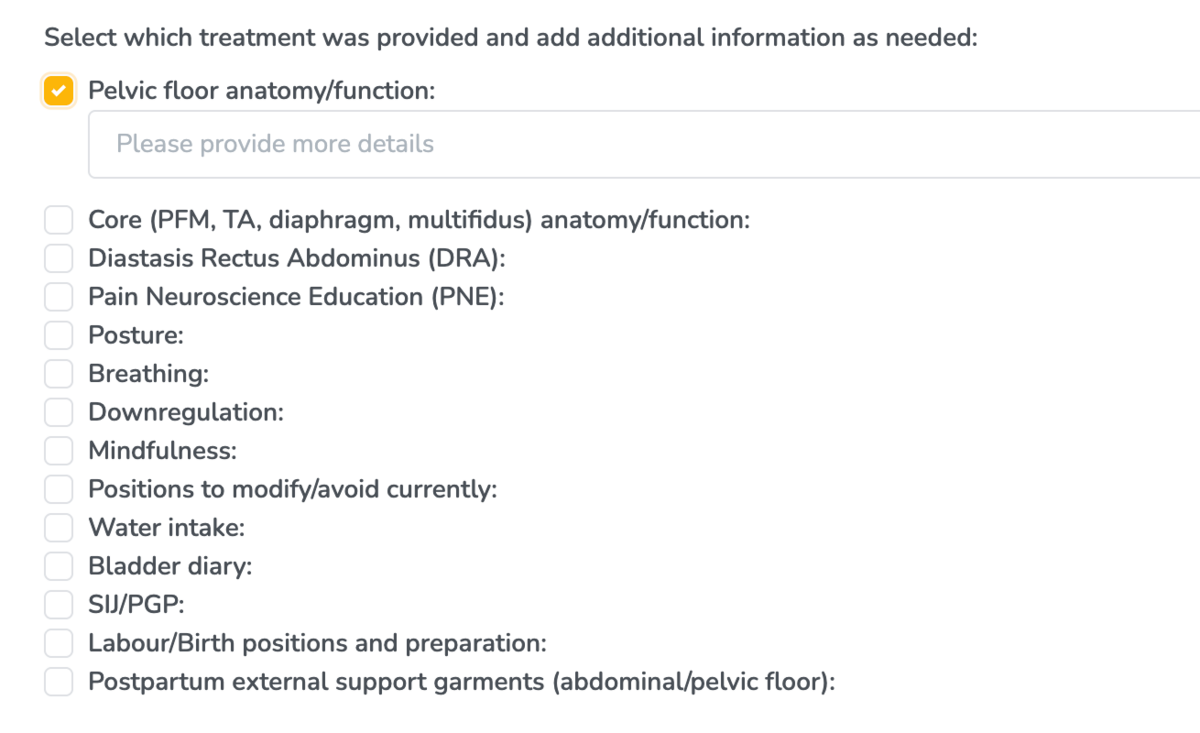
This prompt doesn't require any editing because it is clear as is.
Range
The following example is taking from the chart item '5 Pillars of Health'
Base Prompt: Daily stress - Scale of 0-10

LLM Prompt: Identify the patient’s reported daily stress level on a 0–10 scale. If a number is provided, extract it directly. If the patient gives a descriptive answer (e.g., “pretty high” or “manageable”), infer an approximate number (0–10).
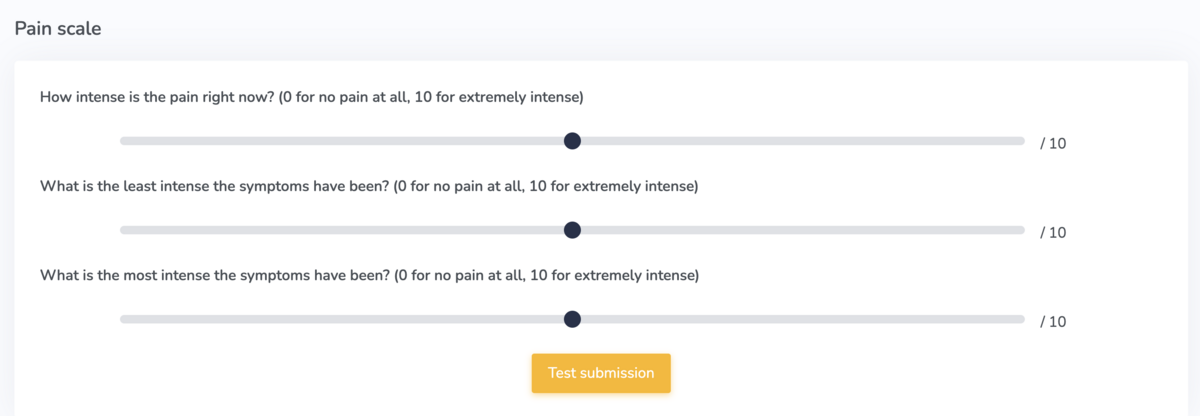
Now let’s try an example with pain scales. This example is taken from the chart item 'Pain scale'.
Base Prompt:
- How intense is the pain right now? (0 for no pain at all, 10 for extremely intense)
- What is the least intense the symptoms have been? (0 for no pain at all, 10 for extremely intense)
- What is the most intense the symptoms have been? (0 for no pain at all, 10 for extremely intense)
Here’s an example of the chart item and what it looks like on Embodia when you’re charting:
LLM Prompts:
- Identify the patient’s reported intensity of pain on a 0–10 scale. If a number is provided, extract it directly. If the patient gives a descriptive answer (e.g., “pretty high” or “manageable”), infer an approximate number (0–10).
- Identify the least intense patients reported symptoms have been on a 0–10 scale. If a number is provided, extract it directly. If the patient gives a descriptive answer (e.g., “pretty high” or “manageable”), infer an approximate number (0–10).
- Identify the most intense patients reported symptoms have been on a 0–10 scale. If a number is provided, extract it directly. If the patient gives a descriptive answer (e.g., “pretty high” or “manageable”), infer an approximate number (0–10).